Hello, Community!
VyOS 1.5.0 LTS release is now finalized and its CLI is frozen for any non-compatible changes. Right now subscribers can already download the generic ISO and other on-premises flavors for x86-64 systems. If you are contributing to VyOS and want LTS release images for personal use, remember that we are happy to share them through contributor subscriptions.
Its development started in 2024 and followed the usual two-year LTS release cycle. In those two years we introduced multiple big features including a long-awaited accelerated dataplane and a huge amount of bug fixes.
Download the full release notes
This release is called Circinus after a small constellation of the southern sky. Its name means "compass" in Latin (the tool for drawing circles and marking distances, not the navigation tool), and it's one of the constellations that French astronomer Nicolas-Louis Lacaille named after tools of artists and scientists in the 18th century. You can see its stylized outline in the boot splash.
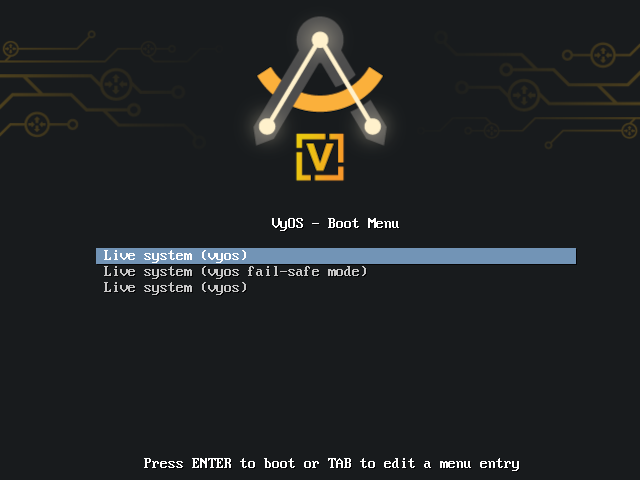
Its base system is still Debian Bookworm, which still has two years of mainstream long-term support even without extended LTS from Freexian, and the fact that VyOS 1.4 and 1.5 use the same base system makes our maintenance efforts simpler.
Upgrade considerations
VyOS now requires at least 2GB of free disk space to perform an image upgrade.
New features
There are multiple new features in VyOS 1.5.0, big and small. Here's an overview of the most significant additions.
VPP-based accelerated dataplane
An accelerated dataplane has been one of the most frequently-requested features for VyOS. We did not rush it because we wanted to get it right and implement it without compromising other goals and values of VyOS.
Now an accelerated dataplane is finally available in an LTS release. It's based on VPP and uses the DPDK driver exclusively at the moment. And it can offer performance up to 15x faster than the Linux kernel dataplane.
And the key point is that, unlike in many other network OSes, in VyOS it is optional and you have full control over it.
If we made acceleration mandatory, it would limit VyOS to a relatively narrow range of hardware, limit its feature set (since many networking features of Linux kernel don't have accelerated equivalents), and greatly increase minimum hardware requirements.
We are committed to make VyOS run on a wide range of hardware including small form-factor devices, so we made a point to make it possible to choose whether to use acceleration or not on per-interface and per-feature basis.
For example, this is how you can enable VPP for specific physical interfaces:
set vpp settings interface eth0
set vpp settings interface eth1
When you commit that configuration, packets that arrive to eth0 and eth1 will be handled by VPP rather than by the Linux kernel dataplane. However, their addresses and all other settings from the interfaces ethernet configuration subtree will be automatically applied (where possible) by VPP's Linux control plane integration.
Traffic between eth0 and eth1 will usually be forwarded inside of VPP without any communication with the kernel. However, traffic between those two interfaces and Ethernet interfaces not assigned to VPP or virtual interfaces such as OpenVPN will still work seamlessly.
VPP-based equivalents of Linux bridges, bonding interfaces, VXLAN, and IPIP and GRE tunnels have somewhat different features available and you need to configure them explicitly in set interfaces vpp. However, traffic forwarding between them and normal Linux interfaces is also seamless.
IPsec acceleration also needs to be enabled explicitly, with a command like set vpn ipsec interface eth0, But when enabled, it will work with the normal VyOS IPsec from set vpn ipsec without a need for special IPsec configuration under set vpp.
Other features of VPP in VyOS 1.5.0 include NAT44, CGNAT, sFlow, and IPFIX.
Minimum hardware requirements for running VPP are 4 physical CPU cores and 8 gigabytes of RAM.
High-performance kernel-mode NetFlow implementation
NetFlow sensor performance was another frequent complaint about earlier VyOS versions. It was based on pmacct, and pmacct is a great project that offers a lot of flexibility but its performance is no longer sufficient for many modern networks.
We knew that multiple VyOS users took the issue in their own hands: they compiled the kernel-based ipt-netflow implementation to install it on VyOS and used it outside of the VyOS configuration system.
Now the NetFlow sensor that's configured with set system flow-accounting netflow is based on ipt-netflow and offers much better performance. A migration script will automatically remove some options that were unique to pmacct and move other options around, and all NetFlow configurations from previous VyOS versions will continue to work as before, only much faster.
sFlow unification
VyOS 1.4.x includes two alternative implementations of sFlow: set system flow-accounting sflow based on pmacct and set system sflow based on a much faster hsflowd.
In VyOS 1.5.0, there's only hsflowd-based set system sflow and old pmacct-based configurations are automatically migrated.
Kea-based DHCP server
As you likely remember, ISC DHCPD has been declared end-of-life since late 2022. It's a mature codebase but it has multiple architectural limitations from the old days that greatly limit the ways to extend it. That is why ISC put DHCPD in maintenance mode over a decade ago and focused on Kea, a new implementation that was developed from scratch to be easy to test and extend.
In VyOS 1.5.0, the DHCP server component is now based on Kea and already features multiple improvements that wouldn't be possible with legacy DHCPD.
New WAN load balancing implementation
WAN load balancing (set load-balancing wan) was the only remaining legacy component we inherited from the old Vyatta Core codebase, apart from the configuration backend. It had multiple implementation issues and bugs that were effectively impossible to fix due to the design limitations of the old code.
VyOS 1.5.0 features a new implementation that we made from scratch specifically to address those problems. The good thing is that its configuration is fully compatible with the old one, so old WAN load balancing setups should continue working as before, just without the stability issues.
One immediately visible improvement is the long-requested option to use firewall groups in load balancing rules. The CLI for it is simple and consistent with other areas where you could use groups, for example:
set load-balancing wan rule 10 source group network-group SomeGroupYou can match all available group types in those rules, including port, address, network, and domain groups.
Behavior changes
DHCP HA name must be set to the host name of the peer now (T8392)
In VyOS 1.4.x and older versions that used ISC DHCP for its DHCP server implementation, the service dhcp-server high-availability name option had to be set to the same value on both primary and secondary servers. The name itself didn't matter, all that did matter was that it had to match on both systems. In effect, it was the identifier of the HA cluster, not the peer
Kea's HA behavior design is very different. It requires service dhcp-server high-availability name to be the host name of the peer. Setting it to any other value will break communication with the HA peer because Kea will consider the system misconfigured and refuse to communicate with the peer.
The unfortunate part is that this behavior change is impossible to fix with a migration script, since it requires information about a remote system. You will need to adjust your configuration manually to make it work after upgrade.
If you are using the high-availability feature of the DHCP server, make sure to set service dhcp-server high-availability name to the value from system host-name of the HA peer on both systems to make the HA setup work.
Manually-assigned multicast addresses are no longer allowed (T8054)
VyOS no longer allows multicast addresses to be assigned to interfaces. Previously, something like set interfaces ethernet eth0 address 224.0.0.100/24 was a valid configuration command. Now the CLI will reject it and configs with such addresses will fail to load.
While Linux kernel and iproute2 allow manually assigning multicast addresses, allowing that in the VyOS CLI was an oversight: such configurations would never work for their intended purposes. For multicast traffic to actually work, hosts need to join multicast groups using IGMP.
Operational commands moved to different families
There is now a new operational mode command family called execute. It will be used for commands that perform some actions on behalf of the user but don't depend on the system configuration and do not modify the system state.
clear connectionis renamed toreset connectionbecauseclearis reserved for completely non-disruptive commands (T7540).monitor bandwidth-testmovedexecute bandwidth-testfor clarity (T6694).force vrf <NAME>is nowexecute shell vrf <NAME>, there's alsoexecute shell netns <NAME>(T6694).telnetis nowexecute telnet, there's alsoexecute ssh(T6694).wake-on-lanis nowexecute wake-on-lan(T6694).force owpingis nowexecute owping(T6694).
Configuration syntax changed (automatically migrated)
IPsec peer mode respond was renamed to trap (T7594)
Previously, IPsec connection mode names were initiate, respond, and none:
# set vpn ipsec site-to-site peer SomePeer connection-type <TAB>Possible completions: initiate Bring the connection up immediately respond Wait for the peer to initiate the connection none Load the connection onlyHowever, those names were misleading and led many people to create problematic configurations.
Internally, that corresponds to StrongSWAN start_action values: initiate to start, respond to trap, and none to none.
The real behavior of StrongSWAN modes is:
start(initiatein the old VyOS terms): initiate the IKE dialog with the peer immediately.none: wait for IKE traffic from the peer or for a user command, do nothing otherwise.trap(respondin the old VyOS terms): respond to IKE or initiate the IKE dialog when matching traffic is detected.
The trap mode of StrongSWAN doesn't really fit the definition of respond, since respond implies the system will not do anything until the peer sends any IKE packets. Moreover, it's unnecessary in most cases and can create duplicate SAs or connection loops.
That situation is a bit tricky to rectify because there are two types of people: those who used respond because they knew how it behaves and specifically wanted that behavior, and those who were misled by the unfortunate name and assumed that was what they had to use if they wanted VyOS to passively wait for IKE packets.
The ultimate solution is still up for discussion and your input is welcome!
For now, however, we made the minimal change and renamed respond to trap to make it clearer what it does and to match the StrongSWAN terminology.
If trap is what you want, you don't need to do anything, the migration script will take care of it automatically. However, if you want your system to wait until IKE packets come from a peer, you may want to set the connection type to none instead.
Removed features
FastNetMon (T7241)
VyOS 1.5.0 no longer includes FastNetMon (set service ids ddos-protection). The main reason is that it was never deeply integrated into the system and that the demand for it from customers has been low.
The integration level from VyOS 1.4.0 is easy to achieve by running FastNetMon in a container, so if you still want to run it on VyOS, you should consider that option.
Blowfish and Twofish cipher support in OpenVPN
OpenVPN no longer supports Blowfish, and for a good reason: it's vulnerable to a Sweet32-type attack and isn't safe to use. It's been deprecated for quite a while and is now removed.
To ensure that all old OpenVPN configurations remain functional, we made a decision to use 3DES in configurations that used Blowfish and nothing else. That will break old clients that are configured with now-unsupported ciphers as only allowed ciphers but it's the best solution that we could think of.
Removed operational mode commands
- Operational mode commands for viewing route cache were removed because they have no effect in modern Linux kernels (T7998).
- The old
run show login levelcommand was removed because the old admin/operator user system no longer exists. (T7538). show configuration filescommand was removed as non-informative and misleading (T6900).
Deprecated features
Salt minion (T8056)
The integration with Salt (set service salt-minion) is now deprecated and will be removed in future VyOS versions. The reason for deprecation is very low customer demand.
OpenVPN site-to-site mode with pre-shared keys
OpenVPN with pre-shared keys has been deprecated since VyOS 1.4.0 already. In VyOS 1.5.0, that functionality continues to work but OpenVPN maintainers are still planning to remove it in upcoming versions, so make sure to migrate to a TLS-based setup if you haven't already.
You can use site-to-site OpenVPN with self-signed certificates and certificate fingerprints as a lightweight alternative to a full PKI setup.
OpenVPN topology "net30" (T6591)
The "net30" topology in OpenVPN used to be the default but it is now deprecated by OpenVPN maintainers and also doesn't work with Windows clients.
It is now deprecated and automatically migrated to "subnet" on upgrade. We do not have a timeframe for removing it yet, that will depend on how long it stays in upstream OpenVPN.
Known issues
DMVPN may still leak unencrypted GRE packets (T4667)
Recently we discovered that our solution for making DMVPN secure isn't complete. It can still leak some unecrypted GRE traffic: most commonly just a few NHRP packets, but there are cases when an IPsec SA can go down but leave the GRE packet stream going.
Unfortunately, the way Linux handles GRE tunnels doesn't give us a way to reliably detect that a GRE packet is associated with a DMVPN profile, so any solution that prevents unencrypted GRE commmunication between DMVPN hubs and spokes will also break GRE tunnels that are intentionally unsecured or secured in a different way.
We will continue looking for proper solutions and ways to modify the Linux networking subsystem to make that possible.
Upgrade from 1.3.8 on VMware requires a workaround
Upgrading from VyOS 1.3.x that was deployed from a VMware vSphere OVA can lose access to the 1.3.x image, after booting into the new image.
To prevent that, before upgrading, edit /boot/grub/grub.cfg , find the set timeout line, and add set default=0 if you are using the graphical console or set default=1 if you are using serial.
What's next?
There are already multiple improvements in VyOS rolling release that we could not include in VyOS 1.5.0 because they require more testing and design reviews. Among them are a Suricata-based IDS, a reintroduction of operator-level users and an introduction of command access controls, and other features that we will consider adding to 1.5.1 and subsequent releases.
We will also start working on the next LTS release and you will start seeing previews of it in VyOS Stream images when time comes. According to our convention of naming releases after constellations sorted by area from smallest to largest, the next release will be named Scutum (shield).


Comments